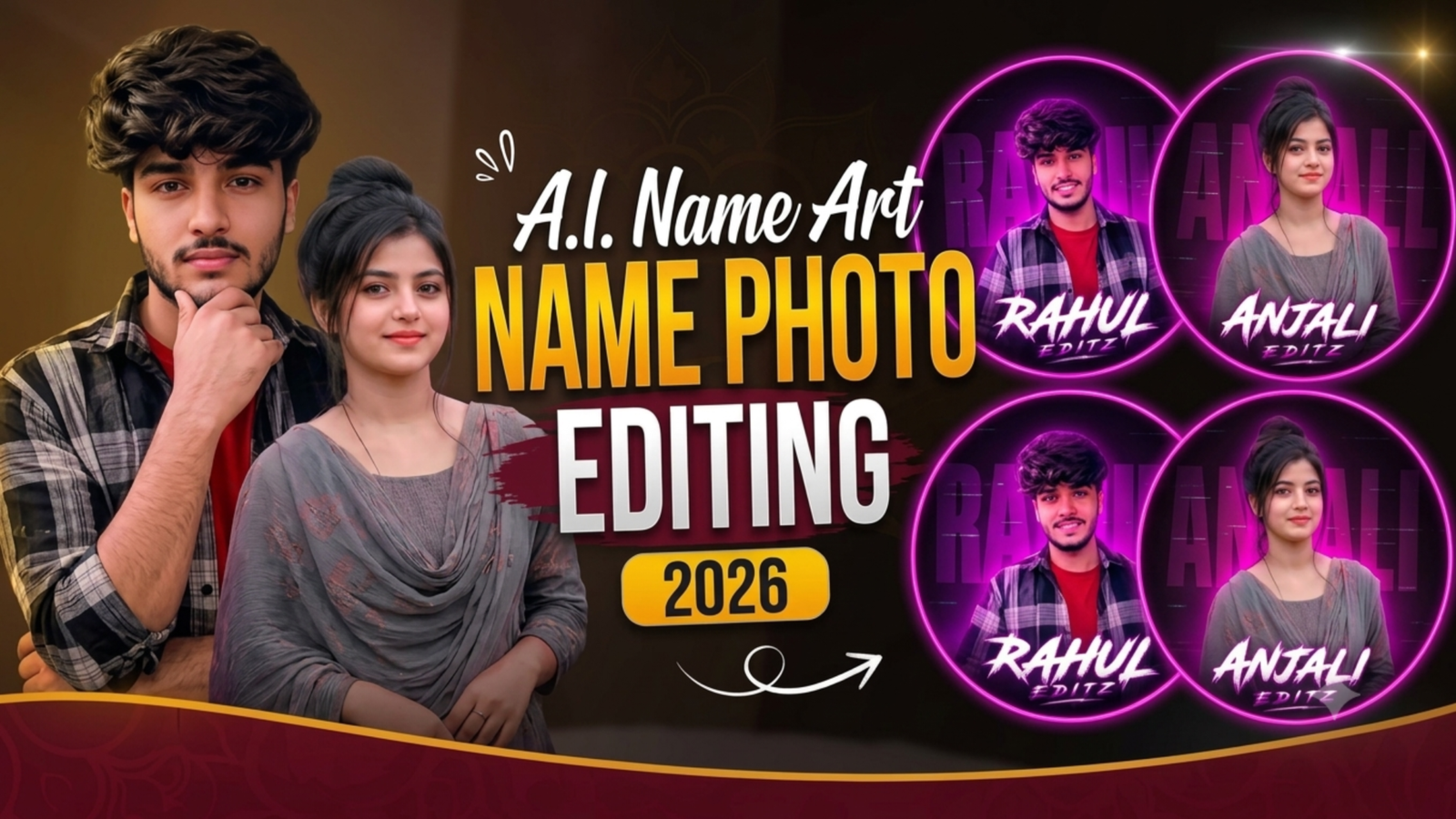
AI Name Photo Editing Prompt 2026: The AI Name Photo Editing Trend is becoming popular among people who want to turn a normal portrait into a stylish digital profile picture. Instead of using a simple filter, this type of AI editing creates a complete poster-style design with a dark background, glowing purple or pink neon circle, digital glitch effects, colorful rim lighting and a large stylish name placed around the lower part of the portrait. The reference images show both male and female versions of this concept, where the person remains the main focus while the neon background and name typography create a modern social-media look. With a clear photo and a detailed prompt, you can create your own version of this design using an AI image editing tool.
What Is the AI Name Photo Editing Trend?
The AI Name Photo Editing Trend is a creative photo-editing style that turns an ordinary portrait into a personalized neon profile poster. The AI can keep the person’s main appearance while changing the visual environment with a black and deep-purple background, glowing circular frame, magenta lighting, digital scan lines, glitch details and large typography containing the person’s name. The style works for both male and female portraits and can be used for Instagram profile pictures, WhatsApp DP, Facebook profiles, YouTube branding or personal social media pages. The combination of a sharp portrait, bright neon glow and bold name design gives the final image a modern digital identity without requiring advanced Photoshop skills.
Best AI Neon Name Photo Editing Prompt
To create a photo similar to the reference images, upload a clear portrait to your preferred AI image editor and use the prompt below. The prompt is designed to create a centered portrait with a glowing neon circle, dark digital background, purple-pink lighting and large custom name typography. Replace YOUR NAME with the name you want to display and adjust the clothing or other visual details according to your original photo.
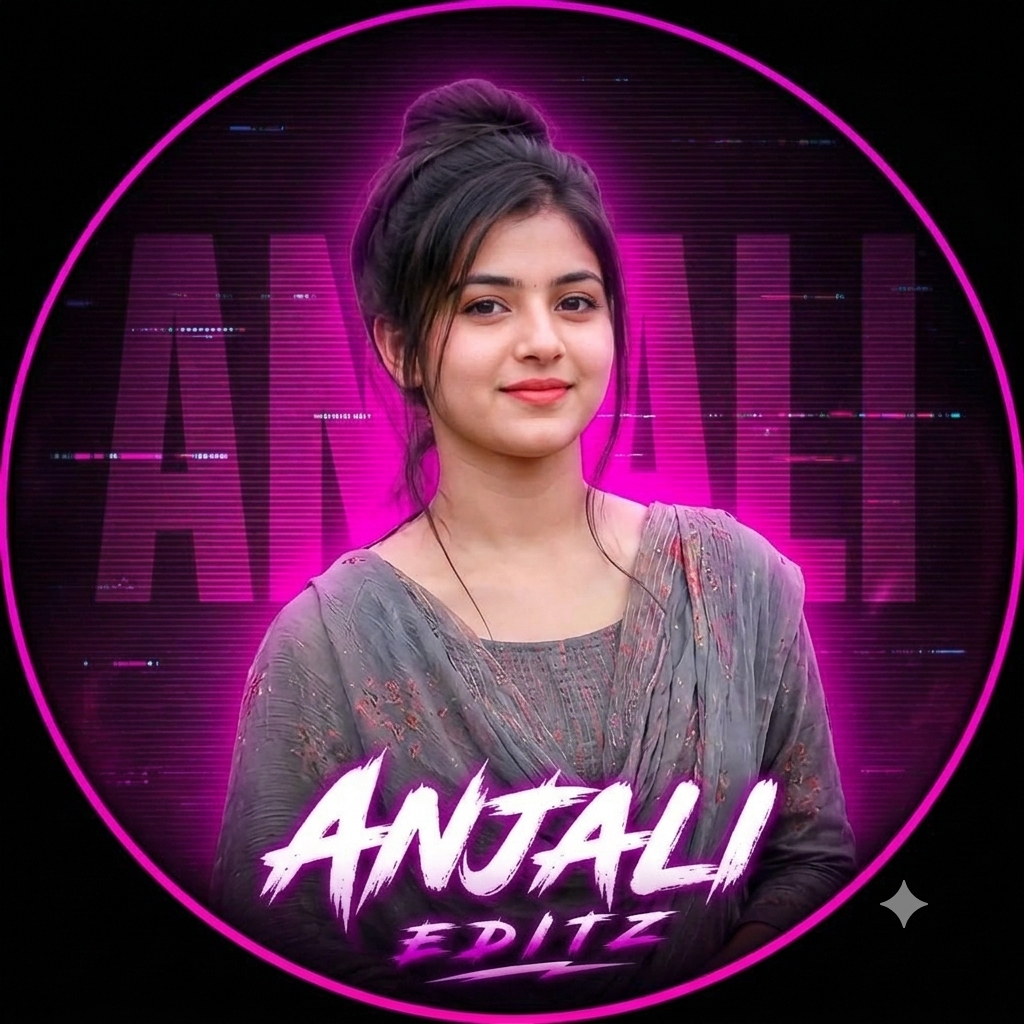
Prompt: An ultra-realistic 8K cinematic portrait using [User_Uploaded_Photo] as the exact face reference, preserving the facial identity, hairstyle, skin tone, and smile.
Overall Design Format: A circular graphic design optimized for a social media profile picture or branding logo. Outer Frame: A thick, bright neon-pink double-line circular border set against a solid dark black outer background.
Background & Atmosphere: A dark center with a vibrant, intense pink neon backlighting glow emanating directly behind the subject to create depth.
A digital aesthetic layer featuring horizontal TV-like scanlines and subtle glitch text patterns repeating the name "YOUR NAME" in a dark sans-serif block font in the backdrop.
Main Typography (Primary Text):Text: "YOUR NAME"
Location: Positioned centrally across the lower section of the frame.
Font Style: Bold, aggressive, handwritten brush-stroke font with jagged edges and a dynamic spray effect. Color Effects: Crisp white inner core wrapped in a high-intensity neon-pink outer glow.Secondary Typography (Sub-text):Text: "EDITZ"
Location: Placed directly below "YOUR NAME", centered.
Font Style: Matches the primary brush-script typography but at a smaller scale. Color Effects: Glowing white text with a prominent pink neon backlight.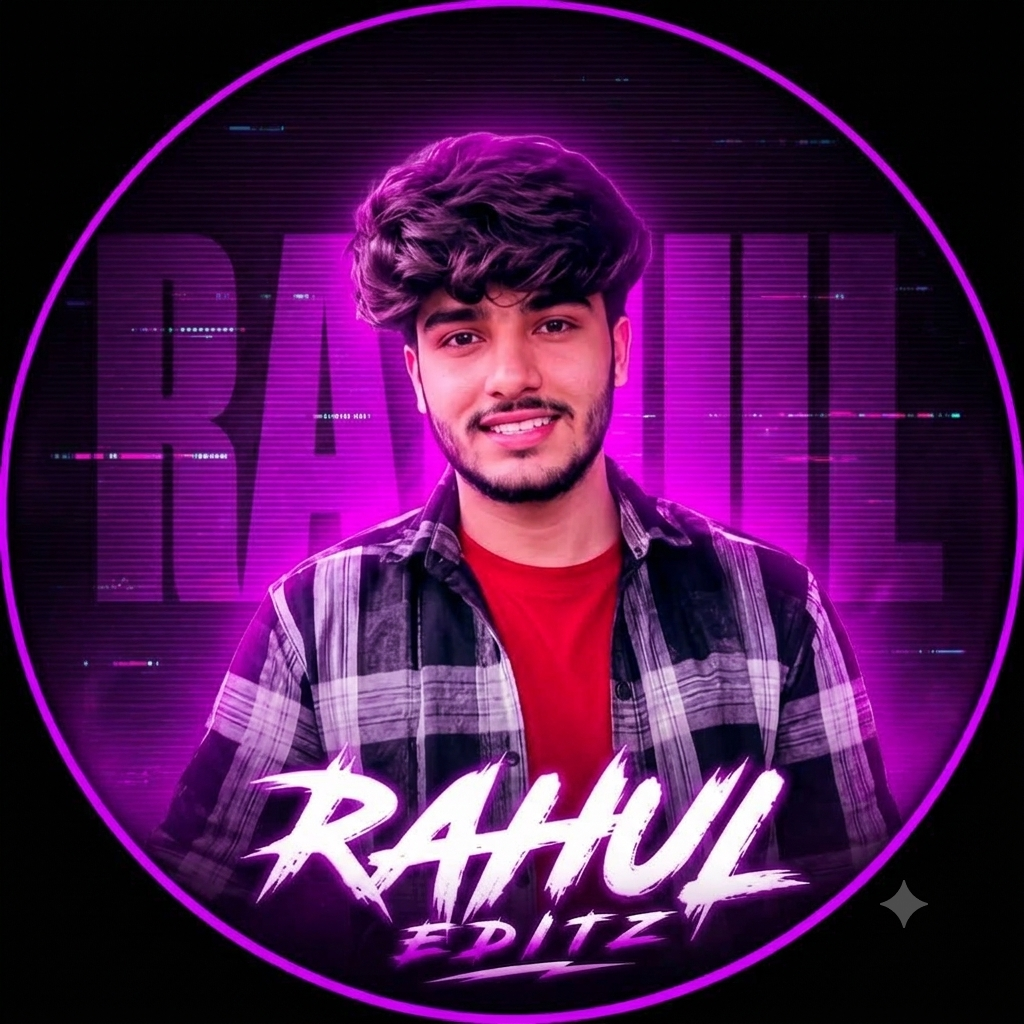
Prompt: An ultra-realistic 8K cinematic portrait using [User_Uploaded_Photo] as the exact face reference, preserving the facial identity, hairstyle, skin tone, and smile.
Overall Design Format: A circular graphic avatar optimized for a social media profile picture (DP) or branding logo. Outer Frame: A sharp, neon purple/pink double-line circular border set against a solid black outer background. Subject (Model & Pose):Subject: A young South Asian man facing directly forward with a warm, friendly smile. Hairstyle & Facial Hair: Dense, voluminous dark brown/black hair with a textured, modern messy style on top, paired with a neat, well-trimmed short beard and mustache. Attire: A dark red crew-neck t-shirt layered under an open black, grey, and white plaid (checkered) flannel shirt. Background & Lighting Effects:Neon Backlight: A high-intensity neon purple/pink backdrop glow situated right behind the head and shoulders, casting a distinct rim-lighting effect on the hair and clothes. Digital Glitch Layer: The dark background features horizontal CRT scanlines, subtle digital noise artifacts, and a large, semi-transparent watermark text of the name "YOUR NAME" written in a tall sans-serif font. Main Typography (Primary Text):Text: "YOUR NAME" Position: Centered horizontally across the lower chest area. Font Style: A bold, aggressive brush-script font with energetic paint strokes and jagged edges. Color Effects: Solid white lettering encased in an intense neon purple/pink outer aura. Secondary Typography (Sub-Text):Text: "EDITZ" Position: Centered directly below the main "YOUR NAME" text. Font Style: Matching brush-script font, scaled down to serve as a tagline. Color Effects: Bright white fill with a matching neon purple backlight.
How to Create an AI Name Photo With ChatGPT
Creating this type of neon name photo with ChatGPT is simple when you have a clear portrait to use as the reference. Upload your photo to the chat and paste the prompt above after replacing YOUR NAME with the text you want to display. ChatGPT can then use your uploaded image as a reference and apply the requested neon circle, dark digital background, purple-pink lighting and poster-style composition. If the first result does not place the name exactly where you want it, you can continue refining the same image by asking for a larger name, stronger glow, cleaner typography or a different neon color. This makes it possible to experiment with the design without needing advanced photo-editing software.
How to Keep Your Face and Appearance Consistent
Keeping the original person’s identity is important when creating a personalized AI profile picture, so the prompt should clearly tell the AI to preserve the face and facial features. Instructions such as “preserve my original face,” “keep my facial features unchanged,” and “maintain my identity” help communicate that the main transformation should focus on the background, lighting and graphic style rather than replacing the person. A clear reference image with visible facial details usually works better than a heavily filtered or blurry photo. Even with strong instructions, AI editing can sometimes make minor changes, so you can refine the result if the first version does not look close enough to the original.
How to Make the Neon Portrait Look Realistic
The neon effect works best when several visual elements are balanced rather than simply adding a bright purple color. Soft magenta lighting, realistic rim light, controlled bloom, subtle scan lines, dark shadows and a clean background help create the futuristic profile effect. The neon circle should glow strongly enough to be visible but should not overpower the portrait. Small glitch elements can add a digital atmosphere, while keeping them subtle prevents the background from becoming distracting. Combining deep black and purple tones with bright magenta highlights also creates stronger contrast and makes the portrait stand out clearly in a square profile image.
Customize the Name and Visual Style
One of the easiest ways to personalize this concept is by changing the name and graphic details inside the prompt. Replace YOUR NAME with your preferred name and use a smaller word such as EDITZ, OFFICIAL, CREATIONS or another short label underneath if you want a branding-style design. You can also change the neon color from purple and magenta to blue, cyan, red or another shade. The circular frame can be replaced with another geometric shape, while the clothing, pose and portrait framing can be adjusted to match your original photo. These simple changes allow you to create multiple versions of the same overall concept without making every image look identical.
AI Name Photo for Instagram and WhatsApp
This design works particularly well as a social media profile picture because the square composition keeps the portrait and name visible even when the image is displayed at a smaller size. For Instagram, WhatsApp, Facebook or a personal creator profile, placing the name below the portrait in a centered position can make the design easier to recognize. If you are using the image for personal branding, a small secondary word such as EDITZ, OFFICIAL or CREATIONS can be placed underneath the main name. The result feels more like a designed digital profile poster rather than a standard portrait with a filter.
Tips for Better AI Name Photo Editing
For a better result, start with a clear portrait where the face is visible and the lighting is reasonably good. Give the AI specific instructions about the portrait framing, neon color, background, name placement and overall lighting instead of relying on a short request such as “make my photo neon.” If the AI generates incorrect spelling in the large name typography, adding the final text manually in an image editor can sometimes produce a cleaner result because AI-generated text can occasionally contain spelling or letter-shape errors. It is also useful to keep the digital effects controlled so the face remains the main focus of the image.
Why Use an AI Photo Editing Prompt?
A detailed AI photo editing prompt gives the image generator a clearer idea of what should change and what should remain unchanged. Instead of simply asking for a neon picture, the prompt can describe the exact background, circular frame, lighting, colors, portrait composition, typography and digital effects required for the design. This is particularly useful when you want a personalized result rather than a generic AI portrait. Once the basic prompt works, you can continue changing individual elements such as the name, neon color, outfit or background to create different versions while keeping the same overall visual identity.
Overall
The AI Name Photo Editing Prompt is a simple way to transform an ordinary portrait into a modern neon profile poster. The combination of a dark background, glowing purple-pink circle, digital glitch texture, colorful rim lighting and bold name typography gives the design its distinctive look. You can use the prompt above with your own portrait and customize the name, colors, clothing, lighting and secondary text according to your preference. After creating the first version, experimenting with different neon colors, poses and typography styles can help you create several unique profile images from the same basic concept.
AI Name Photo Editing Prompt 2026: FAQ
Can I create this AI name photo using my own picture?
Yes. Upload a clear portrait and use the detailed prompt to create a personalized neon profile design based on your photo.
Can I add my own name to the AI-generated image?
Yes. Replace “YOUR NAME” in the prompt with the name you want. For completely accurate spelling, you can also add the final text manually after generating the image.
Can I change the purple neon color?
Yes. You can ask the AI to use blue, cyan, red, pink or another neon color while keeping the same overall design.
Can I make this type of image in ChatGPT?
Yes. You can upload your reference portrait to ChatGPT and use an appropriate image-editing prompt to create a similar neon profile design.
Will the AI keep my original face?
The prompt can specifically instruct the AI to preserve your original face and identity. However, minor changes can still occur during AI editing, so using a clear and high-quality reference photo is recommended.

मेरा नाम राहुल सहनी है और मैं पिछले 5 साल से कंटेंट क्रिएटर हूँ। इस ब्लॉग में, मैं सरकारी जॉब, सरकारी योजना, प्राइवेट जॉब, के बारे में जानकारी देता हूँ।